
01
The speed at the router
If the broadband arriving at the router is slow, no amount of Wi-Fi equipment will help. We test it first so you know where the problem is.
We separate connection problems from coverage problems.
Surrey, Berkshire & the Hampshire borders
Dead spots upstairs, a garden office with no signal, or a smart TV that keeps buffering? We plan and install mesh Wi-Fi and network cabling around the rooms you actually use, so every device gets a reliable connection.
Lines open Mon–Sat, 8am to 6pm
Tap to speak to your local engineer
01483 789110How it works
Step 1
Call or WhatsApp with your postcode, the rooms affected and who your broadband provider is.
Step 2
Your engineer tests the connection and coverage, then recommends access points, cabling or both, with the price agreed first.
Step 3
Access points are fitted and cables run tidily, with outdoor links weatherproofed where needed.
Step 4
We check speeds in each room, connect your key devices and show you how to manage the network.
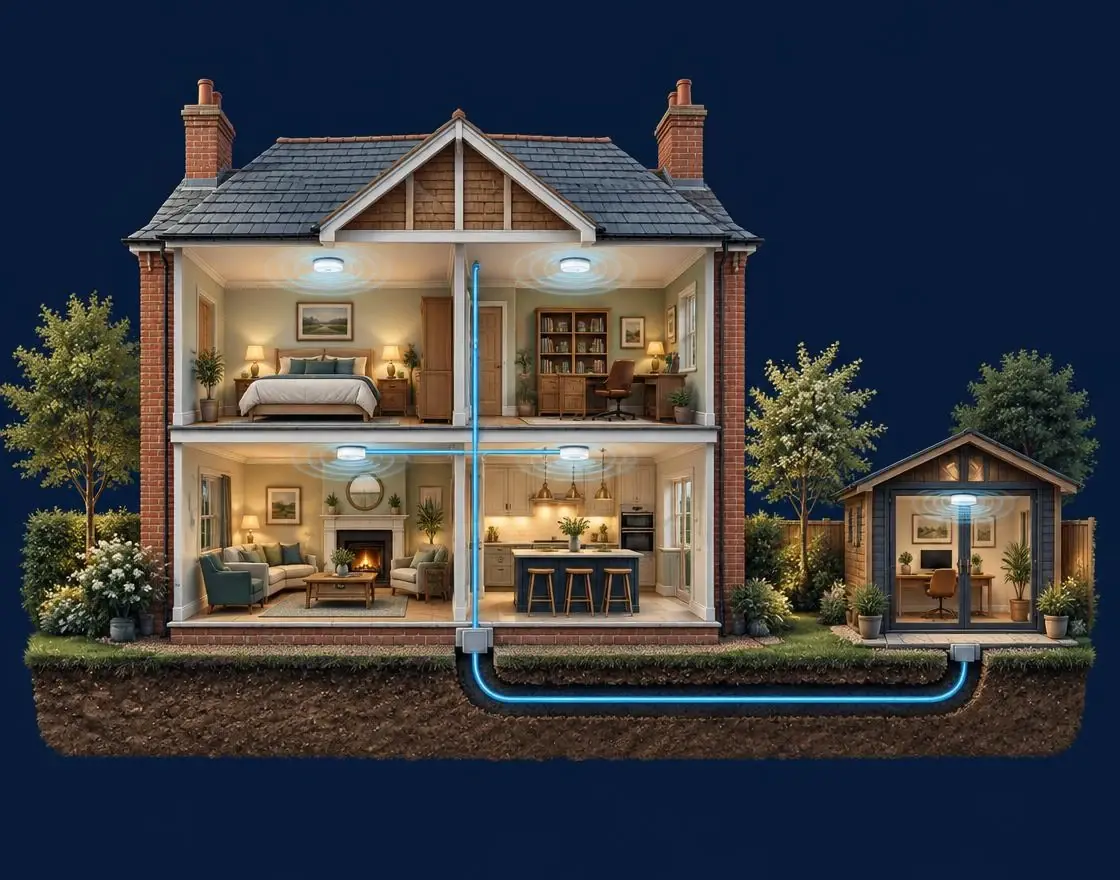
Connected from room to room
Thick walls, long extensions and detached offices can leave weak spots.
Illustrative coverage only — actual results depend on your walls, layout and broadband connection.
Coverage, not just speed
Most homes have one router, usually wherever the broadband line comes in: often the hallway, under the stairs or a front room. Wi-Fi weakens every time it passes through a wall, a floor or a mirror, so rooms at the back of the house, extensions, loft conversions and anything outside are left with a weak, patchy signal.
Surrey and Berkshire housing makes this worse. Solid brick Victorian and Edwardian walls, older cottages with thick stone, modern homes with foil-backed insulation and underfloor heating, and large extended houses all soak up wireless signal. A faster broadband package won’t fix any of that, because the problem is getting the signal around the building, not into it.
We start by finding out which problem you have. We check the speed arriving at the router, then measure coverage room by room. Only then do we recommend mesh access points, a few well-placed cables, or a mix of both.
Networking services
We work with the broadband you already have. Your provider supplies the connection to the house; we make sure it reaches every room, building and device that needs it.
Access points that work together as one network, positioned around your walls and floors so you can move through the house without dropping off.
Neat data points for smart TVs, games consoles, home offices and access points, run through walls and floors where possible rather than clipped along skirting.
A buried or wall-run cable, or a point-to-point wireless link, to bring a proper connection to a garden room, annexe, workshop or stable block.
Reliable Wi-Fi for staff and a separate network for visitors, with cabled points for tills, printers, screens and CCTV recorders.
Wired connections behind wall-mounted TVs and soundbars, so streaming apps and 4K content play without buffering.
TV wall mountingWhere the broadband line itself is the problem, we can fit Starlink and then carry the connection around the property.
Starlink installationGetting it right
Buying more equipment rarely fixes Wi-Fi on its own. These are the four things we look at on every visit.
If the broadband arriving at the router is slow, no amount of Wi-Fi equipment will help. We test it first so you know where the problem is.
We separate connection problems from coverage problems.
We measure the signal in the rooms that matter: the study, the lounge where the TV is, bedrooms and any outbuildings.
We map the weak spots before choosing any kit.
Solid walls, long extensions and separate buildings each need a different answer: another access point, a cable, or an outdoor link.
We place access points where they’ll actually help.
TVs, consoles, desktop PCs and CCTV recorders work best on a wired connection, which also frees up Wi-Fi for phones and laptops.
We cable the devices that benefit most.
Good to know
Plug-in extenders often halve the speed they pass on and create a second network name to switch between. A proper mesh system works as one network, and where access points can be linked by cable rather than wirelessly, each one runs at full speed.
Not always, but a few well-placed cables make the biggest difference in larger and older homes. A cable to the far end of the house or the garden office gives an access point there the same speed as the router, which no wireless hop can match.
No. You keep your provider and your package. If the line itself is the bottleneck, we’ll tell you, and in rural areas we can talk you through options such as Starlink.
Local engineers
Our engineers cover towns and villages across Surrey, Berkshire and the Hampshire border. Pick your town to see the TV and connection services we offer locally.
Mesh improves coverage a lot, but where the access points go, and how they link to each other, matters most. In homes with thick walls, a cable to one or two access points often makes the difference.
Yes. Depending on the distance and access, we run an outdoor-rated cable or set up a point-to-point wireless link, then fit an access point or data points inside.
No. Your provider supplies the connection to the house. We make sure that connection reaches every room, building and device that needs it.
Yes. We plan wired connections for TVs, streaming boxes and CCTV recorders alongside the Wi-Fi, so everything runs reliably together.
Yes, for homes and businesses. A separate guest or visitor network keeps your own devices, cameras and files apart from visitors’ phones.
Guildford Aerial Solutions
Tell us your postcode and where the signal drops, and we’ll take it from there.